01
Seven disconnected tools with no shared truth
How we overcame it: Collapsed into one canvas where configuration, sector mapping and NDVI intelligence live together — one query, one answer.
Case Study · 2024
Onewind unifies configuration management, sector mapping and NDVI intelligence into a single, calm workspace for GE Renewables — powering teams across Germany and multiple global sites — replacing spreadsheets, tribal knowledge and a tangle of disconnected tools.
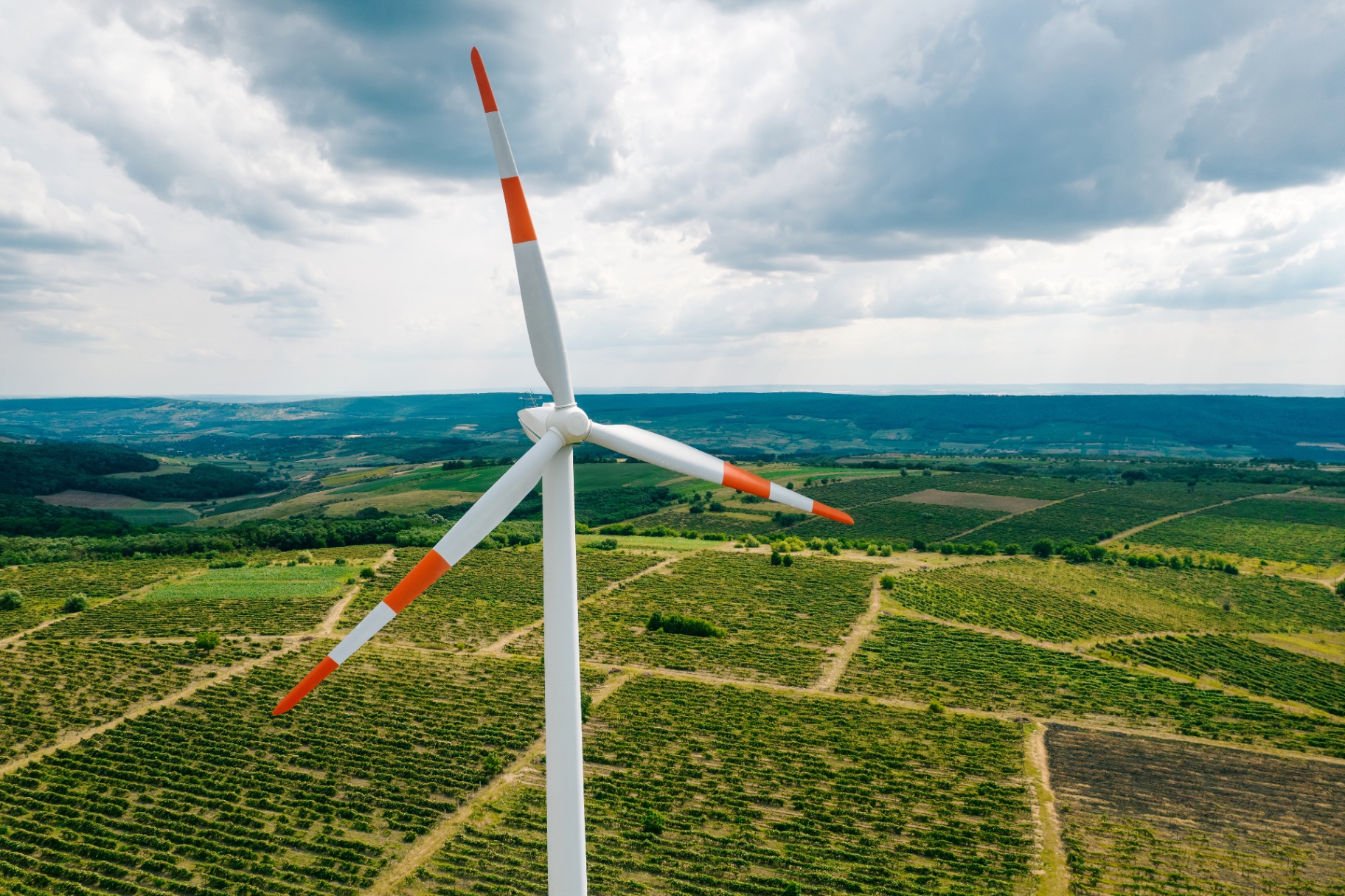
This case study covers the end-to-end UX redesign of Onewind — a platform that unifies wind-turbine configuration and precision-agriculture operations under one canvas. The work spans research, information architecture, interaction design, and a design system that replaced seven disconnected tools with a single source of truth.
Problem Statements & How We Overcame Them
These were the real obstacles discovered during research — and the design moves that removed them.
Seven disconnected tools with no shared truth
How we overcame it: Collapsed into one canvas where configuration, sector mapping and NDVI intelligence live together — one query, one answer.
Configuration data re-entered across NPI, MLA and wind-farm teams
How we overcame it: A single, auditable source of truth with role-based CRUD so every team writes to the same record without overwriting.
Three versions of the same spreadsheet — no one knew which was current
How we overcame it: Versioning and provenance built in: every value is traceable to PLM, SDM, MLA or human approval with a timestamped trail.
Field intelligence (NDVI, soil, weather) separated from asset data
How we overcame it: Agritech lenses overlaid directly on the configuration canvas — a blade-load change and a crop-stress anomaly can be reasoned about in one viewport.
Tribal knowledge trapped in one engineer’s macros
How we overcame it: Loads envelopes, approval rules and notification triggers turned into documented, accessible workflows owned by the system, not a person.
01 — Overview
Onewind began as a configuration platform for NPI engineers and grew into an operations canvas covering sector mapping, health scoring and component-level approvals.
Voice of the customer: “If we're all designing the same wind turbine, why do we all speak different languages?”
02 — The Problem
Configuration lived in PRD matrices, LC databases, Flex5 parameter files and WT_conf_master spreadsheets. Engineers re-keyed the same data across hand-offs, and no one could agree on the latest blade load envelope.
Component data re-entered across NPI, MLA and wind-farm teams.
Three answers to one question depending on the spreadsheet.
Configuration changes took weeks to reach simulation owners.
Loads envelopes lived in macros only one person could read.
“I'm an RCA engineer — what's the original blade load envelope? The latest controller updates for this config? No idea. Wtconfmaster#??? I only speak in PRD#!!!”
03 — Discovery
14 stakeholder interviews across NPI, MLA, certification, PLM and wind-farm engineering. Two AS-IS journey maps, one TO-BE journey, a persona–data–process matrix and a pain-point catalogue per role.
04 — Decision Frame
Four questions framed every design move — how the problem was defined, why this shape over the alternatives, what was traded away, and why the result doesn’t look like anything else in the category.
How I defined the problem
Stakeholders described the pain as ‘seven systems.’ Discovery reframed it: the real problem was that no two systems agreed on the current configuration. I rewrote the brief from ‘consolidate tools’ to ‘establish a single, auditable source of truth that every persona can write to within their access.’ That reframe unlocked the entire IA.
Why this solution over alternatives
We weighed three options: (a) an integration layer that left the seven UIs intact, (b) a dashboard-only ‘viewer’ over the existing tools, (c) a single canvas that owned configuration and surfaced field intelligence side-by-side. We chose (c) because the engineer’s real job is a decision, not a lookup — and only a single canvas let configuration changes and field outcomes inform each other in real time.
The trade-offs I made
Owning the schema meant three legacy reports had to be rewritten and four teams gave up bespoke spreadsheets. The CRUD matrix is intentionally narrow — Loads Engineers cannot edit certification fields, even though the old Excel let them. And v1 shipped without offline mode, because syncing a configuration source of truth offline would have undermined the very trust we were building.
How it’s different from other tools
PLM tools (Windchill, Teamcenter) own configuration but ignore the field. Precision-ag tools (Climate FieldView, Cropwise) own the field but ignore the asset. Onewind is the only surface where a blade-load envelope change and an NDVI anomaly can be reasoned about in the same workspace — because for this operator, they are the same decision.
04 — Design Principles
Configuration, sectors and loads share the same surface — never a separate tool.
Every card answers: is this healthy, who owns it, what changed?
Every value is traceable to its source — PLM, SDM, MLA or human approval.
Alerts only when an action is required. No dashboards-as-noise.
05 — Information Architecture
A login lands in a configuration dashboard; from there, every path (Details, Plant, Task, Device, Activity) maps to a microservice and an owner. Notifications follow the work, not the role.
06 — Personas
| Persona | Access | Role in the flow |
|---|---|---|
| Configuration Owner | Create · Update · Approve | Owns the source of truth for a config revision. |
| NPI Engineer | View · Compose | Builds new configs from certified components. |
| MLA Engineer | Create · Update | Runs loads simulations against a config revision. |
| Certification Team | View · Sign-off | Validates loads envelope and operability. |
| PBM Owner | View · Feedback | Validates loads against physical components. |
| PLM | Sync · Notify | Pushes BOM changes upstream into simulations. |
07 — The TO-BE Journey
Configuration Owner spins up a revision; PLM data flows in.
NPI selects components; constraints validate live.
MLA runs loads against the revision in SDM.
Certification signs off; envelope locks.
PBM owners validate loads against physical components.
08 — The Designs
Each surface is a window onto the same underlying data — sectors, plants, devices, loads — viewed through the lens that matters now.
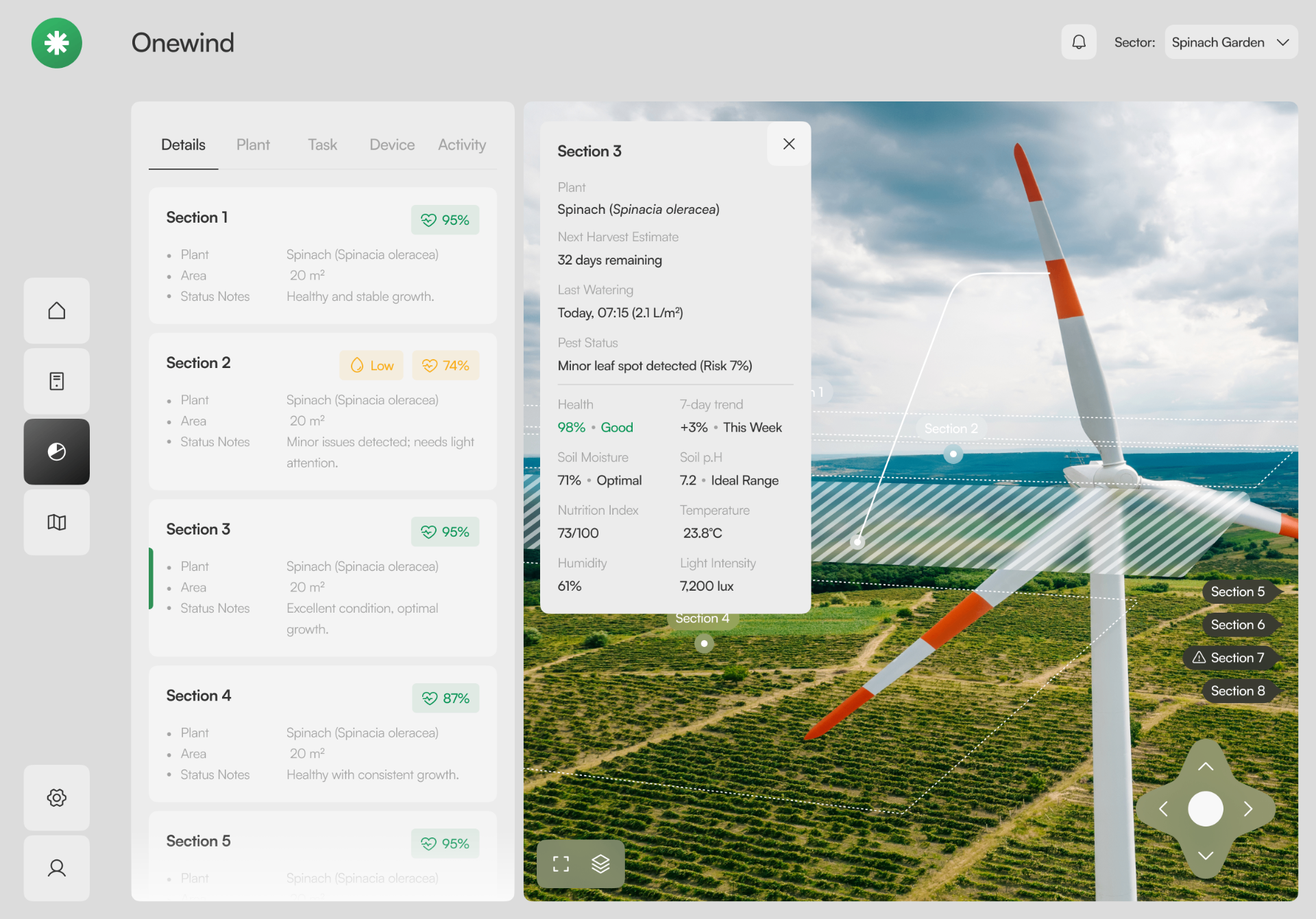
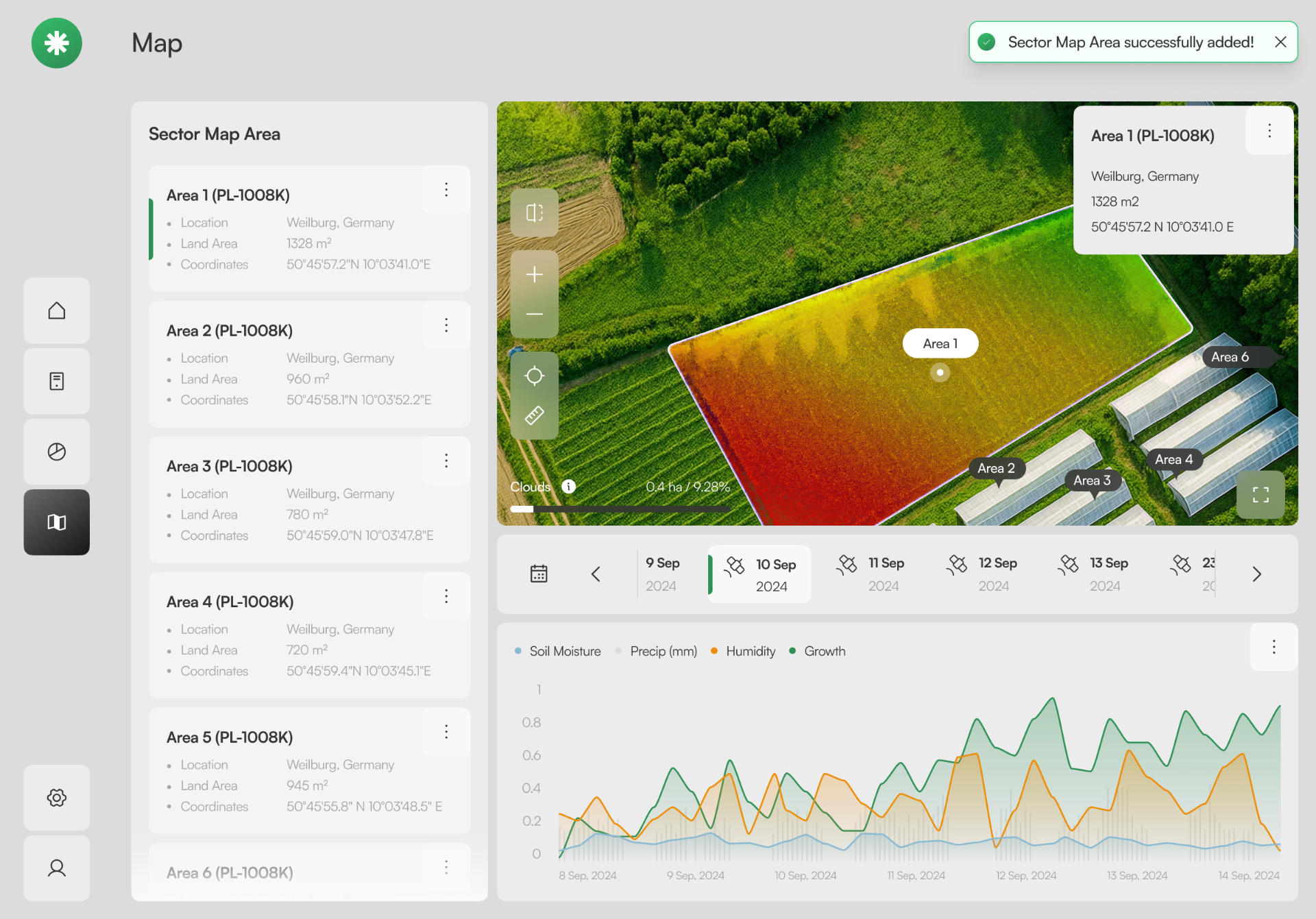
A split view pairs structured sector data with a live aerial scene. The Section 3 popover surfaces health, soil, humidity and a 7-day trend without leaving the map.
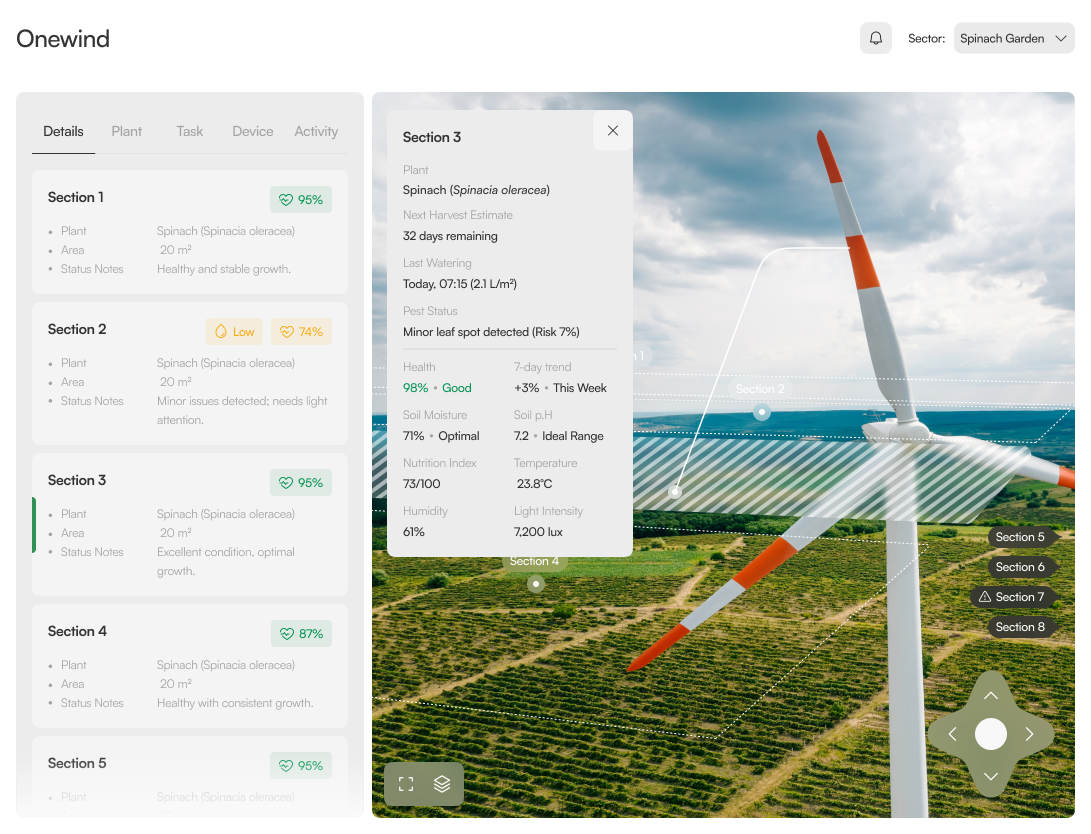
The same canvas tuned for embedded contexts: chrome shrinks, content stays. One layout, two densities — proof the system scales without redrawing.
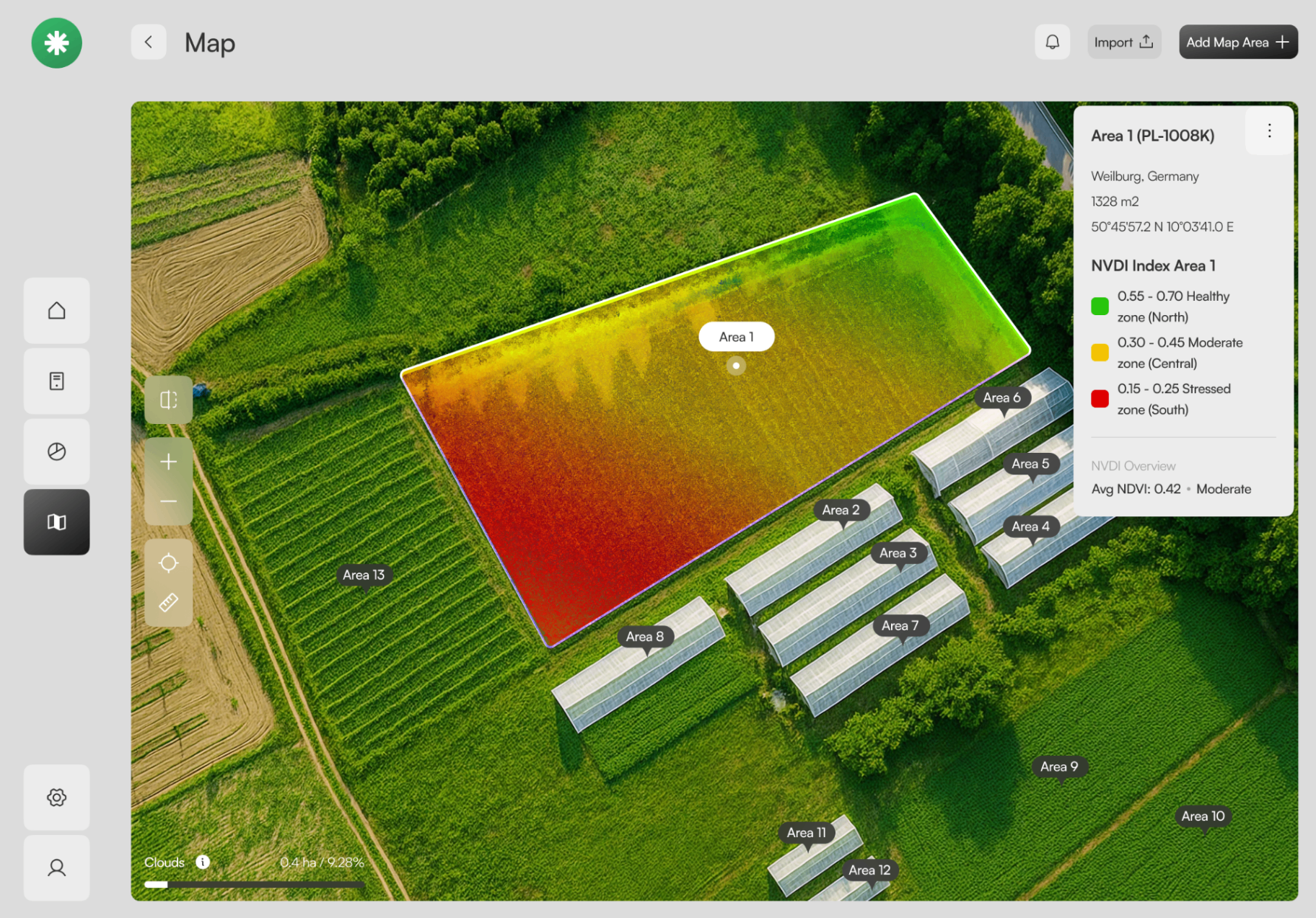
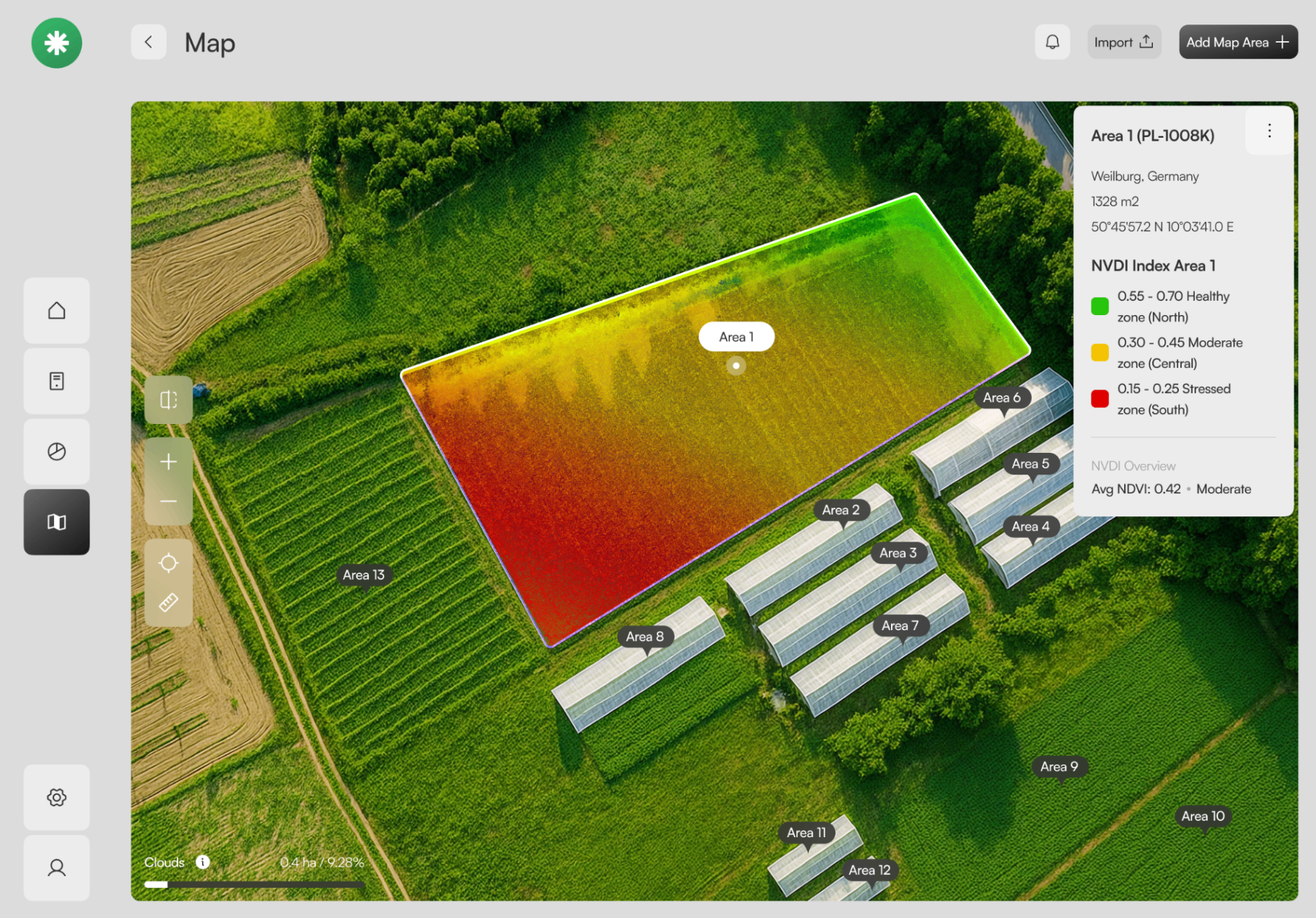
A precision-agriculture lens on top of the configuration canvas. NDVI zones (healthy · moderate · stressed) read at a glance; the legend is the explanation.
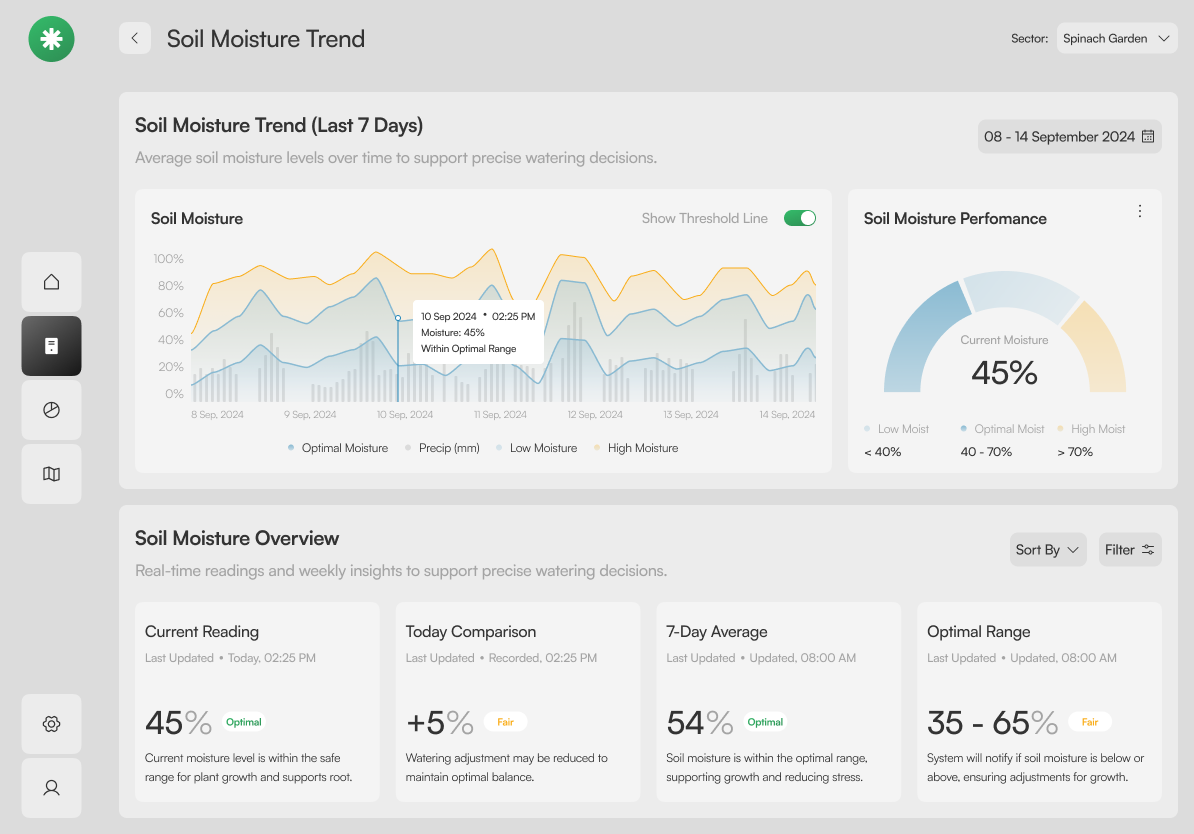
Every map area is a card with location, land area and coordinates. A date strip and metrics chart anchor the temporal view — soil moisture, precip, humidity, growth.
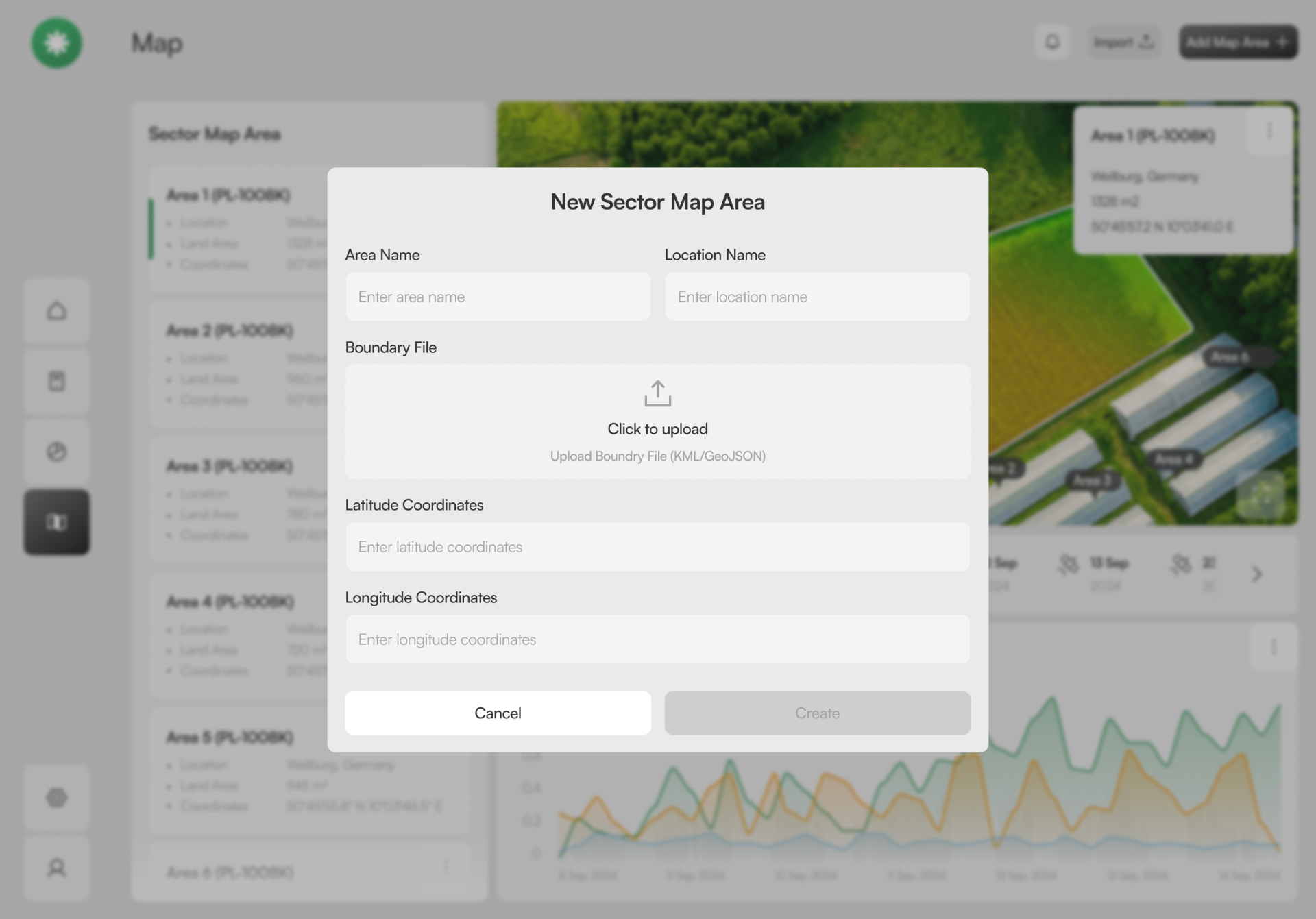
A focused dialog with progressive disclosure: name first, then boundary file, then coordinates. The Create button stays disabled until the area is geometrically valid.
09 — Design System
Greens grounded in soil and leaf, accented by warning amber and a quiet sky blue. Fraunces sets the editorial tone; Inter carries the data; JetBrains Mono for coordinates and IDs.
Process Artifacts
Architecture maps, journey flows, the product roadmap, and the persona-access matrix that shaped Onewind before pixels were pushed.
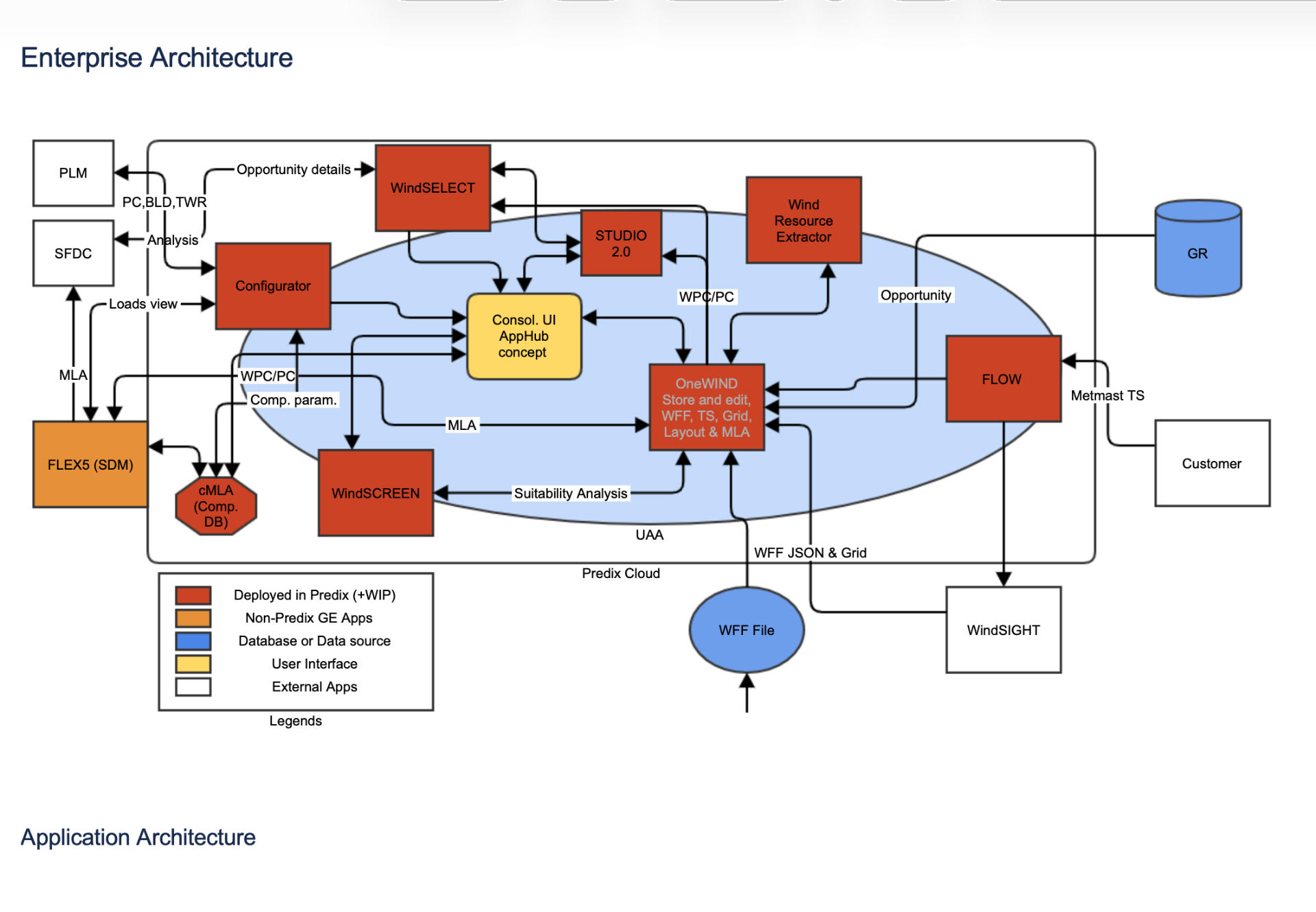
Enterprise Architecture
Before a single screen was drawn, we mapped the full Predix-cloud ecosystem — Configurator, WindSELECT, Studio 2.0, FLEX5, cMLA, FLOW — and the data exchanges between them. This artifact gave the team a shared vocabulary and made the integration seams (PLM, SFDC, Wind Resource Extractor) impossible to ignore.
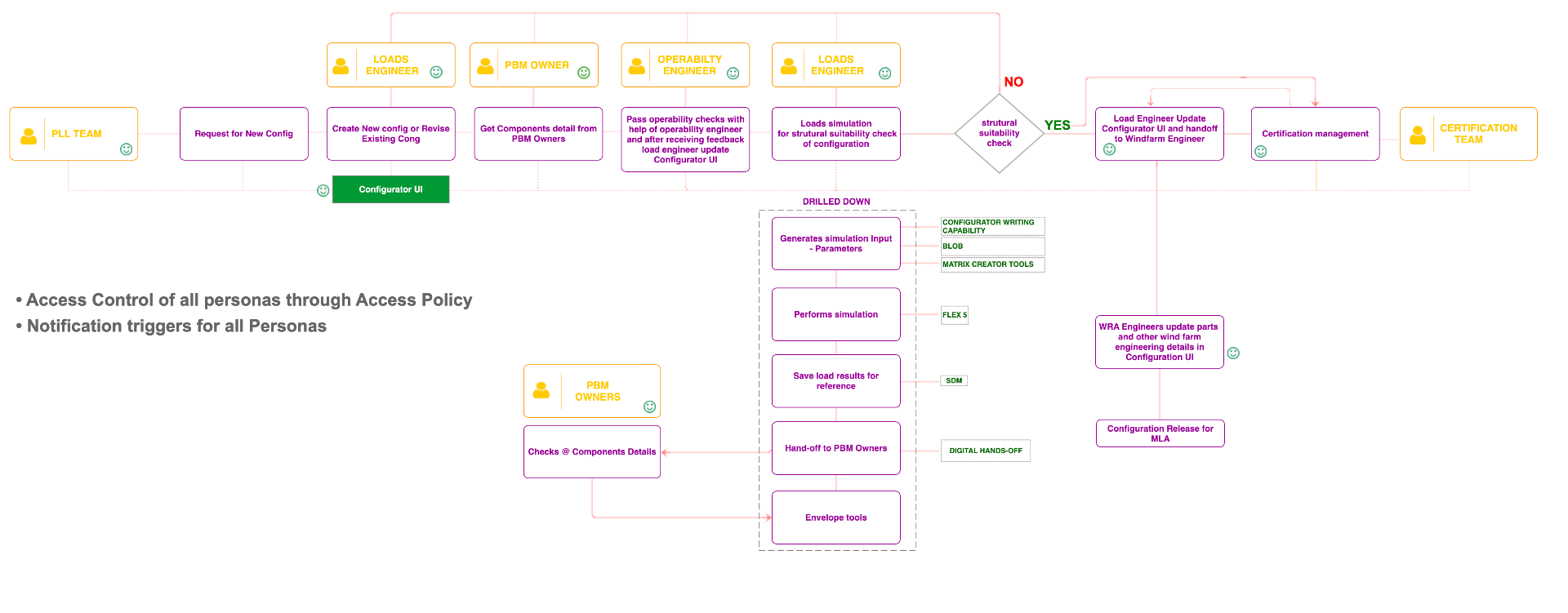
Journey Map
From the PLL Team's request for a new config, through Loads Engineer, PBM Owner, Operability Engineer, and on to Certification — with the drilled-down tooling (FLEX 5, SDM, Matrix Creator, Envelope tools) called out at each step. Access policy and notification triggers are surfaced as cross-cutting concerns.
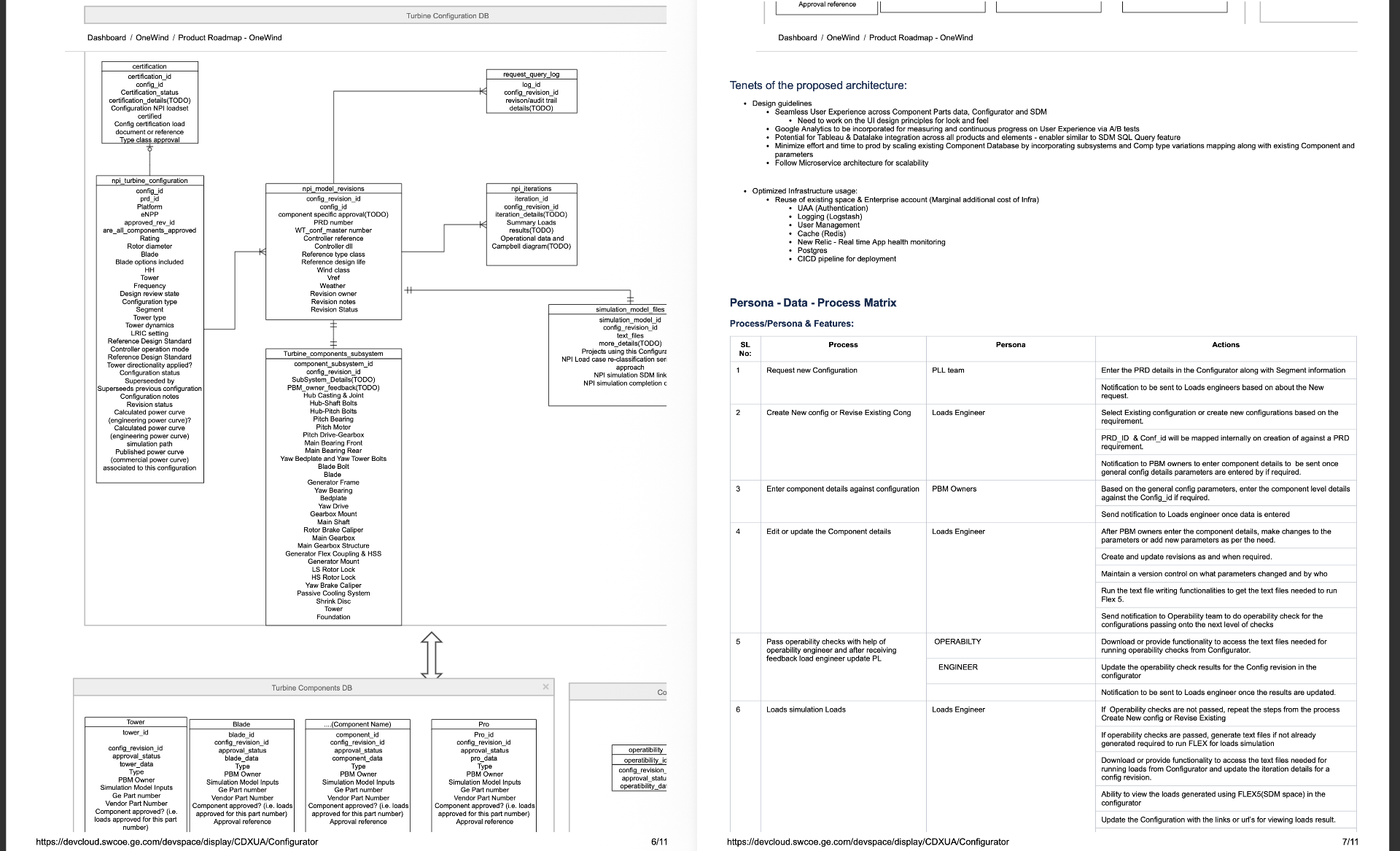
Product Roadmap & Data Model
The proposed architecture tenets (seamless UX, microservices, scaling existing component DB) sit alongside the turbine configuration DB, components subsystem, and a 15-step Process × Persona × Action matrix that became the backbone of every subsequent sprint.
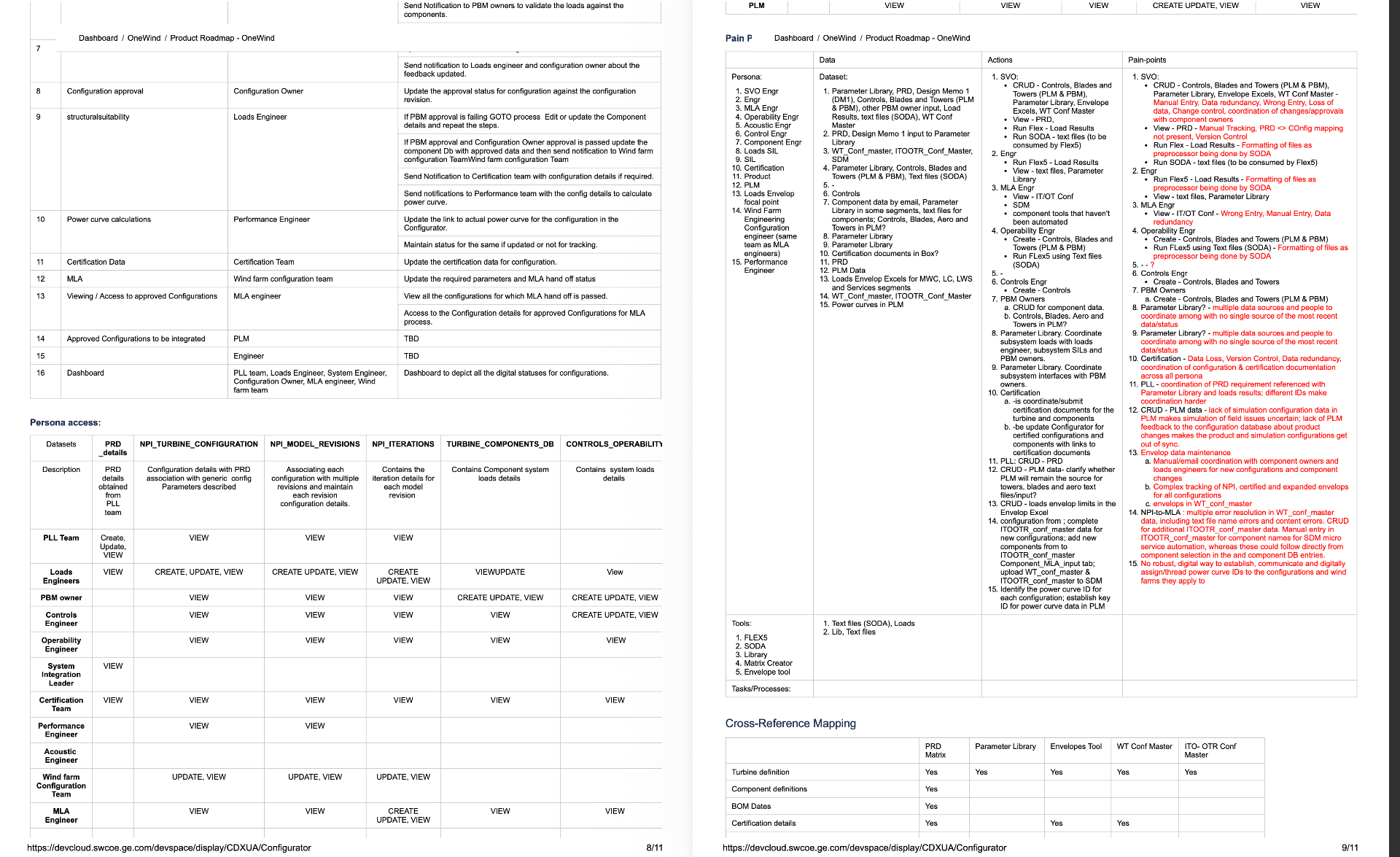
Persona Access & Pain Points
A CRUD access matrix across PLL Team, Loads Engineer, PBM Owner, Controls, Operability, System Integration, Certification, Performance, and MLA engineers — paired with a Data / Actions / Pain-points table that captured the manual entry, version control gaps, and coordination overhead the new system had to eliminate.
Screens · Problem & Solution
For each core screen — what we observed in research, and the design move that resolved it.
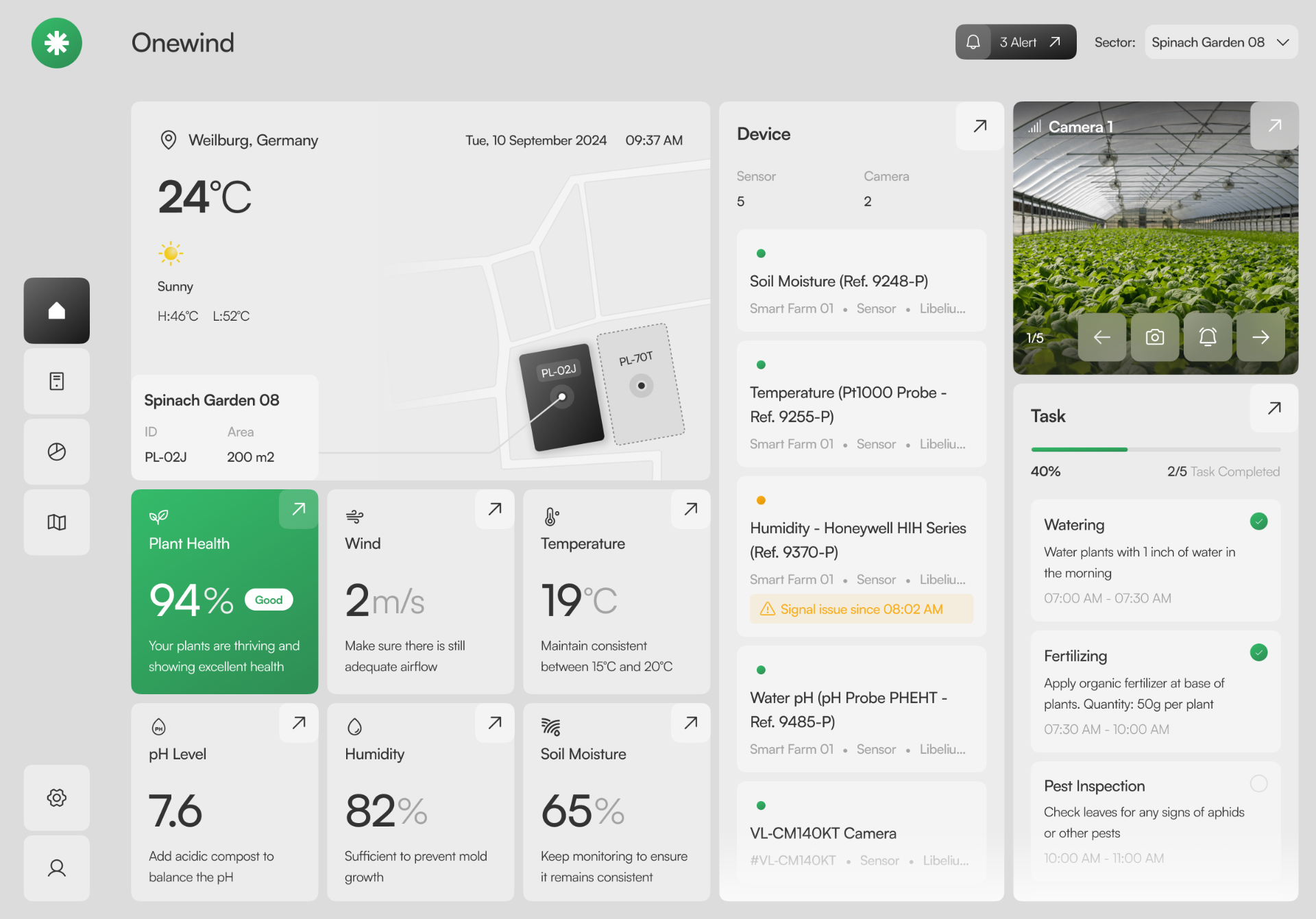
The Problem
Farm managers jumped between 4–5 tools to see weather, sensors, camera feeds and daily tasks. Critical signals — a humidity sensor going offline, a watering window closing — were buried in separate dashboards, so problems were caught late.
How We Solved It
Collapsed the operational picture into one screen organised by mental model, not data source: field context on the left, device health in the middle, live camera and today's tasks on the right. A single Plant Health score acts as the at-a-glance verdict, and inline 'Signal issue since 08:02 AM' badges surface faults where they're relevant.
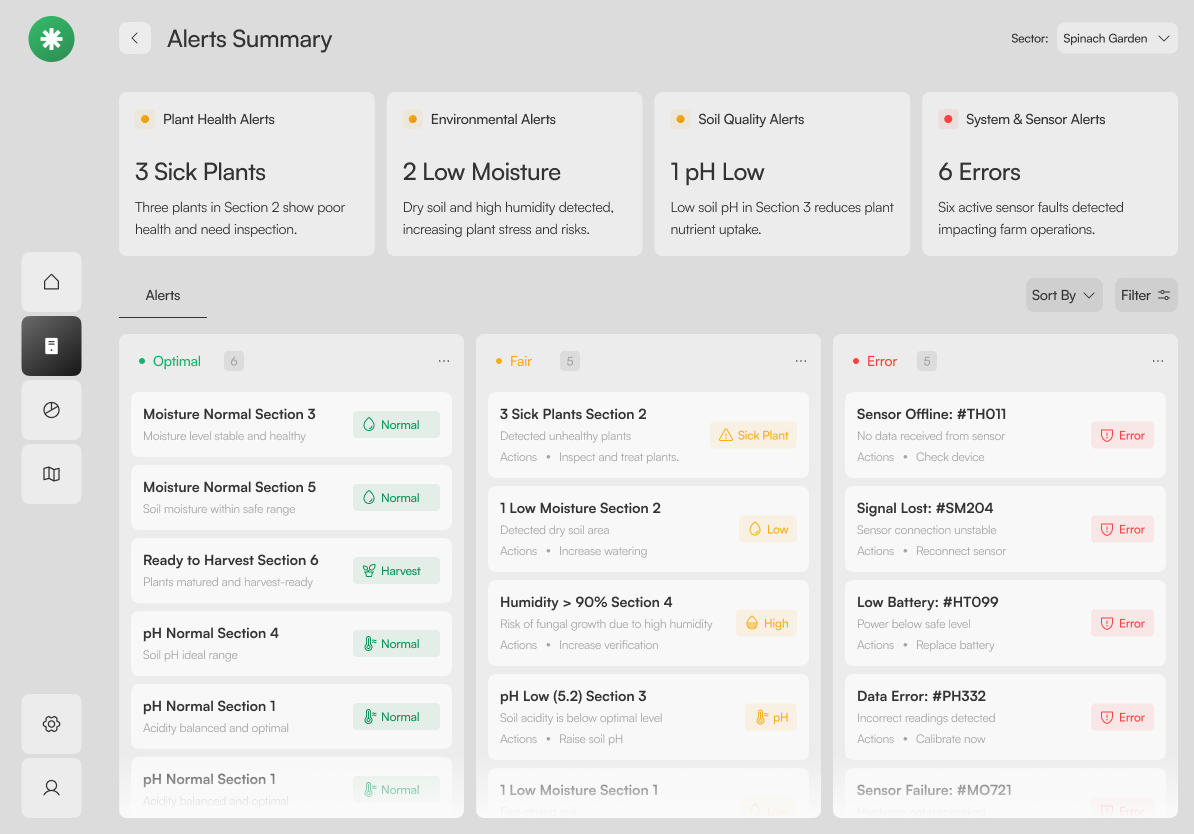
The Problem
The legacy system fired every alert with the same red urgency — a low battery looked identical to three sick plants. Managers learned to ignore the bell, and real issues slipped through.
How We Solved It
Alerts grouped by domain (Plant Health, Environmental, Soil, System) and triaged into three columns — Optimal, Fair, Error. Each card carries a status chip and a recommended Action, so severity and next step read in the same glance.
The Problem
Agronomists received raw NDVI exports as CSV or PDF. Interpreting them meant matching coordinates to plots by hand, and stressed zones were often identified days after the damage was done.
How We Solved It
Rendered NDVI directly on the satellite view with a three-band legend (Healthy / Moderate / Stressed) and per-area overlays. Selecting a zone reveals coordinates, size and average index in a side panel — a 2-second read instead of a spreadsheet exercise.
The Problem
Irrigation decisions were made on a single current reading. Without context, teams over-watered on cool days and under-watered after heatwaves — both hurt yield.
How We Solved It
A 7-day band chart plots moisture against the optimal range and precipitation, with a gauge for the current reading. Four supporting tiles make the recommendation defensible: irrigate, hold, or reduce — with the evidence visible.
The Problem
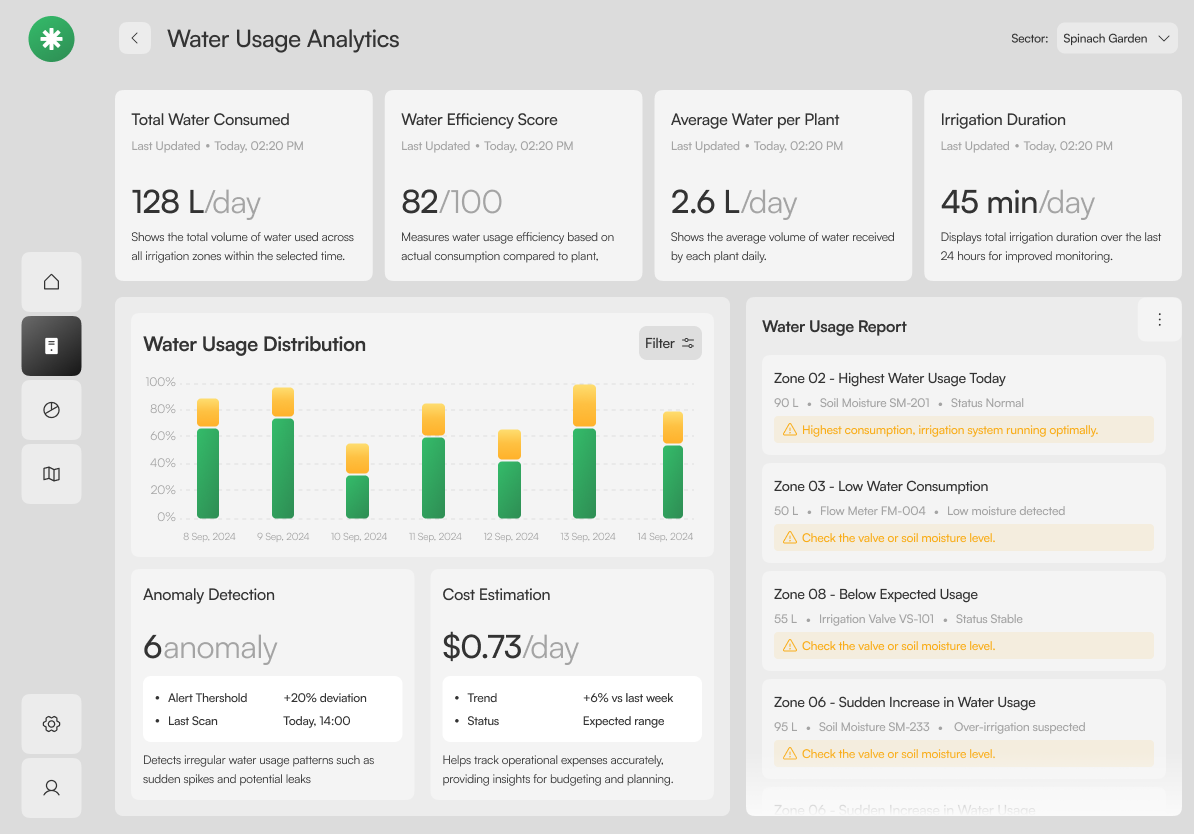
Water was the largest operating cost, but usage data lived in the irrigation controller and cost data lived in finance. No one could answer 'which zone is leaking' without a half-day investigation.
How We Solved It
Consumption, efficiency score, per-plant average and irrigation duration sit above a per-day distribution chart. An Anomaly Detection card flags deviations and the Water Usage Report lists offending zones with a one-line cause.
10 — Outcomes
NPI configuration cycle time
Tools collapsed into one canvas
Cross-team approval velocity
Spreadsheet-of-truth dependencies
11 — Reflection
The hardest part wasn't the UI — it was getting six disciplines to commit to one vocabulary. Next time, I'd run the persona–data–process workshop in week one, not week six.
Bringing the NDVI layer into the same canvas late in the project paid off; it proved the system could absorb adjacent products without breaking. That argument unlocked the next funding round.